Best AI Tools for Beginners in 2026
You don’t need 200 AI tools. You need three — used in the right order.
Open any “best AI tools” list in 2026 and you’ll find the same problem: fifteen, twenty, sometimes forty tools, all described as essential. For someone who has never touched an AI assistant, that’s not a starting point — it’s a wall.
Here’s the more useful truth. The AI landscape has matured enough that a small, well-chosen set of tools now covers almost everything a beginner needs: writing, research, note-taking, design, and daily productivity. You don’t need to master a stack of specialized apps in your first month. You need one general assistant, one research or notes tool, and one output tool — and a clear sense of which is which.
This guide walks through exactly that, task by task, with realistic 2026 pricing so you can decide what’s worth paying for before you commit to anything.
1. What Makes an AI Tool “Beginner-Friendly”
Not every AI product is built with new users in mind. Some assume you already know what a “system prompt” or an “API key” is. A genuinely beginner-friendly tool tends to share four traits:
•No setup friction. You sign up and start typing — no plugins, no configuration screens.
•A useful free tier. You should be able to get real value before paying anything.
•Plain-language interaction. You describe what you want in normal sentences, not code or special syntax.
•A narrow, obvious first use case. The tool should make it obvious what to try first, rather than presenting a blank canvas and a hundred features.
Keep these four traits in mind as a filter. If a tool fails two or more of them, it’s probably not where you should start — even if it’s powerful.
2. The Three-Tool Starter Stack
Before getting into categories, here’s the shortcut version: most beginners get 90% of the value from three tools.
1.A general assistant for everyday questions, brainstorming, and drafting (ChatGPT, Claude, or Gemini).
2.A research tool for anything that needs current, sourced information (Perplexity, or NotebookLM if you’re working from your own documents).
3.An output tool matched to what you’re producing — Canva for visuals, Grammarly for polishing writing you’ve already drafted.
Everything below expands on these categories so you can pick the right specific tool for your situation.
3. Best AI Tools for General Help and Everyday Questions
This is the category most beginners should start with, because it covers the widest range of tasks: answering questions, brainstorming, drafting emails, explaining concepts, and general problem-solving.
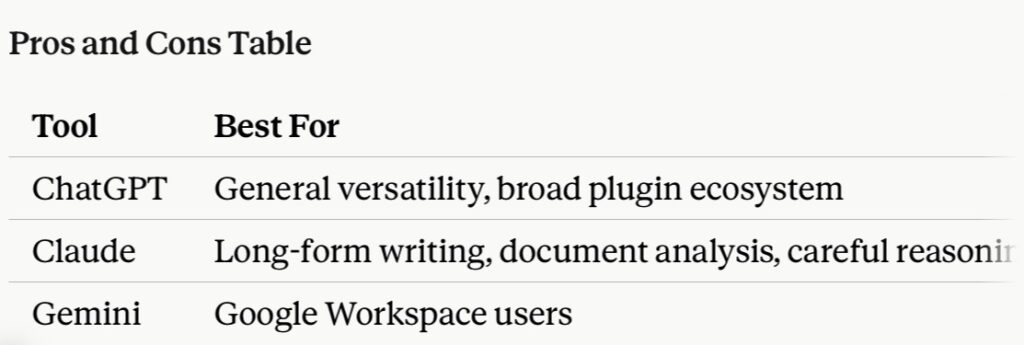
ChatGPT remains the most widely recognized starting point. The free tier gives limited access to OpenAI’s current models, with a paid Plus plan around $20/month for higher limits and more capable models.
Claude, from Anthropic, is a strong alternative and is particularly well-suited to longer writing, careful analysis, and document-heavy work. Claude’s free tier includes a capped number of messages per day, with Claude Pro priced at roughly $20/month (around $17/month if billed annually) for substantially higher usage limits and access to more capable models.
Gemini, from Google, is the natural choice if you already live inside Gmail, Docs, Sheets, or Android, since it’s built directly into those tools. Google AI Pro runs about $20/month.
Which one should a beginner pick first? If you’re not tied to any particular ecosystem, try the free tiers of ChatGPT and Claude side by side for a week on your actual tasks — writing an email, summarizing an article, planning a project — and see which one’s responses you trust more. If you already use Google Workspace daily, Gemini’s tight integration may outweigh any small quality differences.
4. Best AI Tools for Research and Fact-Checking
General assistants are good at explaining concepts, but they’re not always the right tool for finding current, verifiable information — that’s a job for a research-focused AI.
Perplexity is built specifically for search-style questions and returns answers with cited sources you can click through and verify, which matters if you’re using AI for anything you plan to publish, present, or rely on professionally. The free tier includes a limited number of “Pro” searches per day, with Perplexity Pro priced around $20/month.
Use Perplexity when the task is exploration, comparison, or fact-checking rather than full drafting — it shines at “what’s the current state of X” questions.
5. Best AI Tools for Writing and Long-Form Content
If your main use case is producing longer pieces — articles, reports, scripts, or detailed emails — Claude is frequently recommended specifically for this category, thanks to its handling of structure, tone consistency, and longer context. ChatGPT is a capable alternative here too, particularly for brainstorming and quick first drafts.
A practical workflow: draft with a general assistant, verify any factual claims with a research tool like Perplexity, then polish the final language with a dedicated editing tool (see Section 8).
6. Best AI Tools for Notes and Working from Your Own Documents
Google NotebookLM solves a different problem: instead of asking an AI general questions, you upload your own materials — PDFs, notes, articles, class readings — and NotebookLM builds grounded summaries and structured notes strictly from those sources. This matters for students and knowledge workers who want an AI tool that stays anchored to their own material rather than pulling in outside information. NotebookLM is free to use.
7. Best AI Tools for Design and Visuals
Canva, with its AI features (often marketed as Canva AI or Magic Studio), is the standard beginner pick for visual content: social graphics, presentations, simple video edits, and marketing images. Its drag-and-drop interface with AI-assisted suggestions makes it approachable even with zero design background. The free tier covers basic AI design features, with paid plans unlocking more advanced generation tools.
For beginners specifically interested in AI image or video generation as a creative pursuit rather than practical design, note that model access has consolidated into hub platforms that let you switch between leading image and video models from one dashboard, rather than needing a separate account for every model. This is generally a gentler entry point than learning any single specialized generation tool in isolation.
8. Best AI Tools for Cleaning Up Writing
Grammarly remains the standard recommendation for polishing writing you’ve already drafted — catching grammar issues, adjusting tone, and tightening sentences. It’s a smaller, more focused tool than a full AI assistant, which is exactly why it’s a good beginner pick: it does one thing well and integrates directly into the apps you already write in.
9. What These Tools Actually Cost in 2026
Pricing has settled into a fairly predictable pattern across the major AI providers in 2026: genuinely usable free tiers for sampling, and paid tiers clustered near $20/month for regular use.
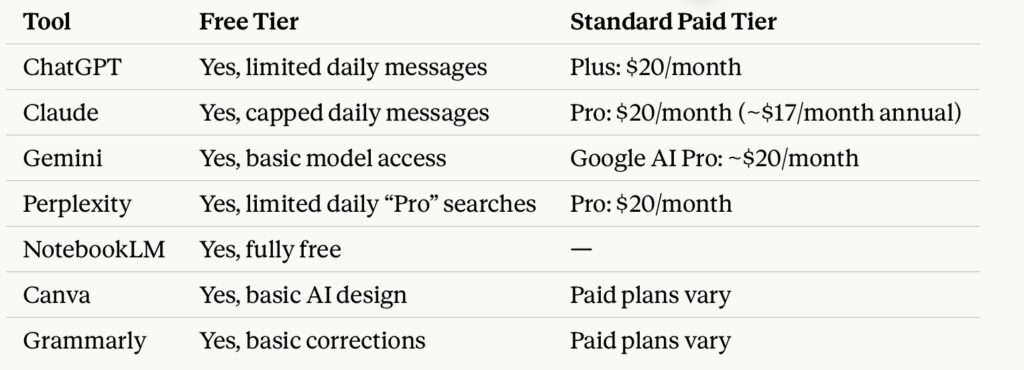
A practical budgeting note: every major provider now offers a real free tier, not just a demo. It’s entirely possible to build a useful beginner workflow — one general assistant, one research tool, one output tool — without spending anything for the first few weeks. Only upgrade to a paid tier once you’ve hit the free tier’s limits often enough that it’s actually slowing you down.
Common Mistakes
• Trying to learn ten tools at once. This is the single most common beginner mistake — it creates decision fatigue instead of results.
• Skipping verification. Treating any AI assistant’s output as automatically correct, especially for facts, statistics, or anything you plan to publish.
• Ignoring the free tier limits. Hitting a daily cap mid-task and assuming the tool is broken, rather than understanding the limit upfront.
• Choosing a tool based on hype instead of task fit. The “best” AI tool is the one that matches what you’re actually doing, not the one trending on social media that week.
• Never adjusting the prompt. Beginners often accept a mediocre first answer instead of simply asking a follow-up question or rephrasing the request — AI conversations are iterative by design.
Expert Tips for Getting Useful Results Fast
1. Be specific about the outcome, not just the topic. Instead of “tell me about marketing,” try “write a 3-sentence Instagram caption for a small bakery’s new sourdough loaf.”
2. Treat the first response as a draft, not a final answer. Ask follow-up questions to refine tone, length, or detail.
3. Match the tool to the task, not the other way around — don’t force a research tool to do creative writing, or a general assistant to do sourced fact-checking.
4. Verify anything that matters. If a number, date, or claim will be published or acted on, check it against a primary source.
5. Give the AI context. Mentioning your audience, goal, or constraints (“this is for a beginner audience,” “keep it under 200 words”) consistently improves output quality.
Future Trends to Watch
Looking ahead, a few shifts are worth watching as a beginner building habits now:
• Consolidation of tools into hubs. Multi-model platforms that bundle chat, image generation, and document analysis into one subscription are becoming more common, which may eventually simplify the “which tool do I need” decision.
• Deeper integration into everyday software. AI features are increasingly built directly into tools people already use — email clients, spreadsheets, design software — reducing the need to switch apps entirely.
• Continued price stability near $20/month. Standard paid tiers across major providers have converged around a similar price point, suggesting this may become the baseline “professional tier” price rather than something that keeps climbing.
FAQ
What is the easiest AI tool for beginners to use?
ChatGPT and Claude are generally considered the easiest entry points, since both work through plain-language conversation with no setup required beyond creating an account.
Are AI tools free to use in 2026?
Yes — every major AI provider offers a genuinely usable free tier in 2026, though each comes with daily usage limits that vary by tool.
Which AI tool is best for writing?
Claude is frequently recommended for long-form writing and document work, while ChatGPT is a strong alternative for brainstorming and quick drafts.
Do I need coding skills to use AI tools?
No. All the tools covered in this guide are designed for non-technical users and work entirely through everyday conversation.
What AI tool should a small business start with?
A general assistant (ChatGPT or Claude) for daily writing and planning tasks, paired with Canva for marketing visuals, covers most small business needs without requiring a large toolkit.
The hardest part of starting with AI in 2026 isn’t the technology — it’s the noise around it. Every list promises the “best” tools, but very few tell you how many you actually need or in what order to try them. The honest answer is small: one general assistant to think alongside, one research tool to keep it honest, and one output tool to turn ideas into something finished. Start there. Everything else can wait until you’ve actually outgrown it.
Call to Action
Pick one tool from this guide, open its free tier today, and point it at something real — an email you need to write, a topic you need to research, or a graphic you need to design. Skill comes from use, not from reading one more list.
#AITools #ArtificialIntelligence #AIForBeginners #Productivity2026 #ChatGPT #Claude #Gemini #TechTrends2026 #DigitalMarketing #NoCodeAI